
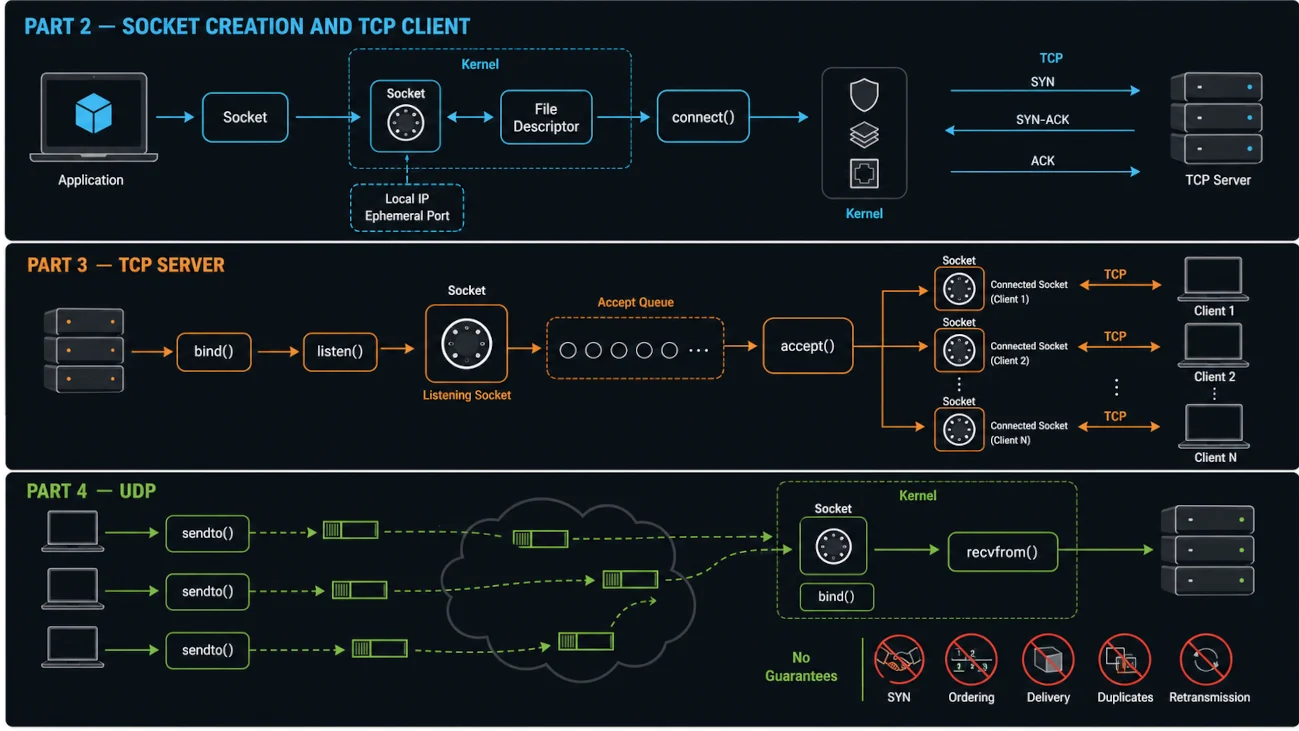
We know that for your application to connect to anything, it first needs to obtain a Socket. Now let’s see how that is done.
Step 1: Creating a Socket
When an application asks the OS, “Please open a Socket for me,” the request typically includes a few pieces of information that determine how the Socket will communicate.
The first is the Protocol Family: whether the Socket will use IPv4, IPv6, or local communication. The second is the Socket Type: whether data should be sent as a continuous stream, like TCP, or as discrete messages, like UDP. The third is the Protocol itself.
In C, the call looks like this:
socketFileDescriptor = socket(SOCKET_FAMILY, SOCKET_TYPE, PROTOCOL);When the OS receives this call, it performs several steps. They are not the focus of this article, so what we need to understand is that the OS does the following.
First, it allocates a small kernel object that represents a communication Endpoint. This object lives in the kernel’s memory and mainly contains several important pieces of information.
The Socket Type determines how data will be sent, either as a stream or as messages. The kernel uses this type to select the appropriate communication mechanism, such as TCP or UDP.
The Protocol Family defines the format of addresses, such as IPv4 or IPv6, and determines which Network Layer mechanism should be involved.
The Protocol selects the exact protocol implementation to use. Even within the same Protocol Family, there may be multiple protocol options. This is rare, but possible.
The Internal State keeps track of the current state of the Socket, such as whether it is Connected, Unconnected, or Listening.
The Socket also contains pointers to protocol-specific logic. These are function pointers that point to the actual implementations responsible for handling the selected Protocol.
Second, the OS creates a File Descriptor in your process, or application, by assigning a small integer such as 3, 4, or 5. This integer is essentially an index that refers to the kernel Socket object created in the previous step. Your process can then use this File Descriptor to refer to the Socket in future System Calls.
It is important to note that at this moment, there are no IP addresses defined, no Ports assigned, and no Buffers allocated to store data. By default, the Socket is disconnected.
What your application has at this point is a reference to a kernel-managed object that represents a communication Endpoint. It is correct to say that this Socket itself has no idea where it needs to go yet. It is like an empty envelope with no address written on it.
So at this moment, we have two things: a kernel-managed Socket object, and a File Descriptor in our application that refers to this kernel object.
But we are still solving the puzzle: how can this tiny kernel object, reachable only through a small integer in your application, eventually connect you to the entire Internet?
The answer comes in the next step. The system call depends on the role of the application and the protocol it uses:
connect()   TCP client: establish a connection
bind()      TCP server or UDP endpoint: claim a local address
sendto()    UDP sender: send a datagram to a chosen destination
Step 2: Connecting to a Socket + Sending Data
What actually happens in this step varies depending on two things: whether we are a client, meaning a sender, or a server, meaning a receiver; and whether we are using a connection-oriented protocol such as TCP or a connectionless protocol such as UDP.
We will walk through three main paths.
Path A: You are a client
Connecting to the Server
Keep in mind that we are talking about a connection-based protocol such as TCP. With connectionless protocols such as UDP, there is no need to call
connect() followed by send(). Instead, the standard approach is to use sendto() directly.
To connect, we need a few pieces of information. First, which Socket should be used? Second, we must provide the destination address, which includes the receiver’s IP address and Port Number. Third, we also pass the size of that address.
Remember that your application and the OS kernel live in separate memory spaces. The kernel therefore needs to know exactly how many bytes it should read from your application’s memory to retrieve the complete address: nothing less and nothing more.
In C, the call would look like this:
connect(sockFileDescriptor, address, sizeof(address));So your application tells the OS: “Connect this Socket to this address.”
In response, the OS performs several operations. First, it validates the address and then adds the destination, consisting of the IP address and Port Number, to the Socket object.
Second, the OS needs to figure out who you are. In other words: “When I receive a reply, where should I send it?”
Finding the IP Address: your machine may have multiple Network Interfaces, such as Wi-Fi and Ethernet, and each interface may have its own IP address. The OS uses routing policy and the selected interface to choose a suitable source address; the exact choice can change with the destination and current network state.
On Linux, you can run ip route to inspect the routing table. The command and a sample result look like this:
$ ip route
default via 10.234.98.197 dev wlo1 proto dhcp src 10.234.98.27 metric 600
172.17.0.0/16 dev docker0 proto kernel scope link src 172.17.0.1
The OS finds the best route for the destination IP address. If the destination is, for example, 93.184.216.34, which is a public IP address, the OS may use the default route through 10.234.98.197 and select 10.234.98.27 as the source IP address. The exact result depends on the current routing table and interfaces.
Finding the Port: an IP address alone is not enough because your machine is running many processes. Since you did not bind the Socket to a specific Port, the OS selects one from its Ephemeral Port Range. On Linux, that range is typically 32768–60999.
The OS selects an available ephemeral Port, for example 54321, and assigns it to your Socket.
Now the OS has your complete local address: 10.234.98.27:54321. It stores this information in the Socket object, establishing the local endpoint that will be used for communication.