
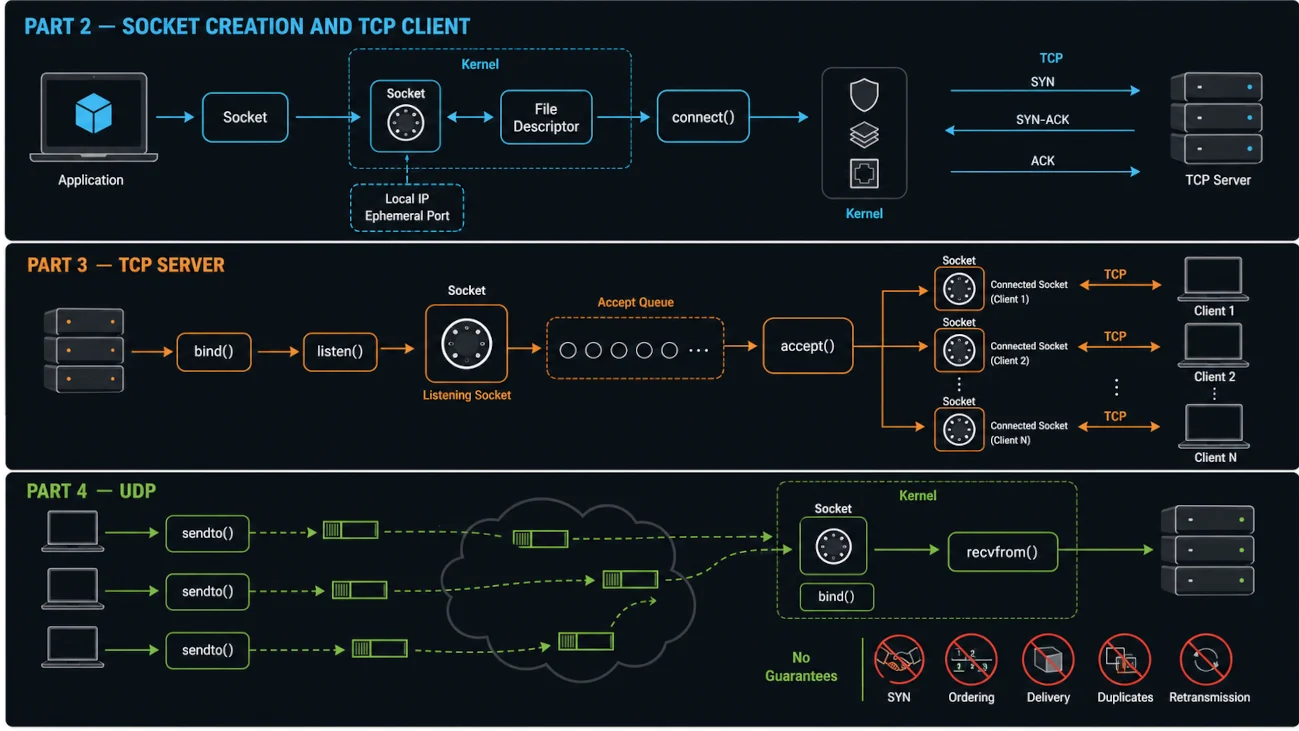
Path C: Using a Connectionless Protocol such as UDP
Now let’s talk about what happens when we use a Connectionless Protocol such as UDP.
Step 1: Creating the Socket
This step is identical whether we are using a Connection-Oriented or Connectionless Protocol. We still need to obtain a Socket and pass similar information to the OS. The difference is that here we configure the Socket to work with datagrams, which are messages with specific boundaries.
In C, the call looks like this:
sockFileDescriptor = socket(SOCKET_FAMILY, SOCKET_TYPE, PROTOCOL);The OS returns a File Descriptor that points to the created Socket object, exactly as before.
Step 2: No Connection, Just a Datagram
With UDP, there is no connection to establish. Instead, we use sendto() to send each datagram directly to its destination:
sendto(sockFileDescriptor, buf, len, 0, &destAddr, sizeof(destAddr));As you can see, we are targeting the Socket that we created in Step 1. We pass buf, which points to the first byte of the data to send; len, which tells the kernel how many bytes of data we want to send; destAddr, which contains the destination IP Address and Port; and sizeof(destAddr), which allows the kernel to know the size of the destination address structure.
The critical difference here is this: each sendto() call is independent. We can use the same Socket to send data to different destinations because the destination address is specified in each call.
For example, it is completely valid to send a datagram to 8.8.8.8:53 and then immediately send another datagram to 1.1.1.1:53. There is no connection that permanently ties the Socket to one destination.
The thing that remains persistent is the Source Address. Once the OS determines the local IP Address and Port for the Socket, that local endpoint remains associated with the Socket.
In response to the sendto() call, the OS performs several operations.
First, it uses the Routing Table to determine the appropriate source IP Address and Network Interface.
Second, it selects a Port Number from the available ephemeral ports if the application has not already bound the Socket to a specific local Port.
Third, it stores this Source Address, consisting of the local IP Address and Port, on the Socket object.
Fourth, the kernel copies the data from buf, up to len bytes, into kernel memory. The UDP stack then adds a UDP Header to form a UDP Datagram and passes it to the IP Layer.
Notice what did not happen: there was no connection, no handshake, and no permanent destination associated with the Socket. This datagram is being sent to one destination, while the next datagram can be sent to a completely different destination. UDP does not guarantee delivery, ordering, duplicate suppression, or retransmission; an application that needs those properties must implement them or use a protocol that provides them.
The IP Layer then wraps the UDP Datagram inside an IP Packet. IPv4 may fragment a packet when necessary, although applications generally try to avoid this; IPv6 routers do not fragment packets. The kernel then determines how to route the packet using the Routing Table.
For example, the routing table may contain: default via 10.234.98.197 dev wlo1 src 10.234.98.27. This means that the next hop is 10.234.98.197, which is our gateway or router.
Before sending the packet over the local network, the kernel needs to know the MAC Address of the next-hop device. Since the destination IP, such as 8.8.8.8, is not on the same Subnet as our machine, the packet is sent to the Gateway rather than directly to 8.8.8.8.
The kernel therefore looks up the Gateway’s MAC Address in its neighbor table. For example: 10.234.98.197 dev wlo1 lladdr aa:bb:cc:dd:ee:ff REACHABLE.
The Link Layer then wraps the IP Packet inside an L2 Frame, adding the appropriate MAC Addresses. This Frame is placed into the NIC’s Transmit Ring Buffer, a region of shared memory used for communication between the OS and the network hardware.
The NIC then reads the Frame, converts the data into the electrical, radio, or other physical signals required by the underlying network technology, and transmits it onto the network.
What about the receiver? It uses
bind() to claim a local address, then recvfrom()to receive each datagram.
Step 1: Creating the Socket
Creating the Socket is exactly the same as in the other cases. The difference is that we configure it to work with the Connectionless UDP Protocol.
Step 2: Binding the Socket
The server calls
bind(sockFileDescriptor, localAddress, sizeOfLocalAddr). This gives the Socket an identity by associating it with a local IP Address and Port. From this point on, packets arriving for this local address can be delivered to this Socket.
When the receiver gets a UDP packet, the kernel examines its destination address and, if it passes validation and filtering, places it in the Receive Buffer for the matching bound Socket. Packets can still be dropped because of errors, firewall rules, buffer exhaustion, or because no Socket is listening on the destination.
Step 3: Receiving a Datagram
The application can then call recvfrom() like this:
recvfrom(sockFileDescriptor, buffer, sizeOfBuffer, senderAddr, sizeOfSenderAddr);The buffer is a block of memory in your application, not in the kernel. This is crucial to understand. It is memory that your application allocates to receive and store the incoming data.
sizeOfBuffer specifies the maximum amount of data that it is safe for the OS to copy into your application’s buffer. The OS checks this size when it copies the data.
senderAddr is different from the local address stored on the Socket. The sender’s address is not permanently added to the Socket object. Instead, the kernel copies it into your application through senderAddr in case the application wants to reply to that sender.
The Socket itself does not permanently store the sender’s address because, as we established earlier, a UDP Socket can receive messages from many different clients. It is not a peer-to-peer connection; in fact, there is no connection at all. This is why a single UDP Socket can communicate with thousands of different clients.
You can think of senderAddr as a data structure provided by your application where the kernel can write the sender’s address so that your application can use it.
So what does recvfrom() actually do?
First, the OS looks at the Receive Buffer associated with this Socket. If there are no packets available, recvfrom() waits until a packet arrives.
If packets are available, the OS selects the oldest one and copies its payload, without the network headers, from the Socket’s Receive Buffer into the memory that your application allocated for receiving the data.
It also copies the sender’s address into the memory provided through senderAddr.
Finally, recvfrom() returns the size of the data copied, which normally represents the payload size. If the application buffer is too small, the datagram can be truncated; applications that need to detect this should use the appropriate flags such as MSG_TRUNC.
Now your application has three important pieces of information: the actual data that was sent, the address of the sender, and the true length of the message.